

Which Are the Best USB Hubs for All Devices?
Ever felt stuck because your laptop only has two USB ports while your desk is full of devices waiting to be plugged in? You need one that works well with everything you own, from laptops to phones to gaming consoles. Let's explore some of the best USB hubs that do precisely that.
Anker 10-Port USB 3.0 Data Hub: Great For Multiple Devices
Anker has built a solid reputation for making reliable accessories, and this hub doesn’t disappoint. With 10 ports in total—7 for data and 3 for charging—it’s perfect if you have a lot of devices to connect at once.
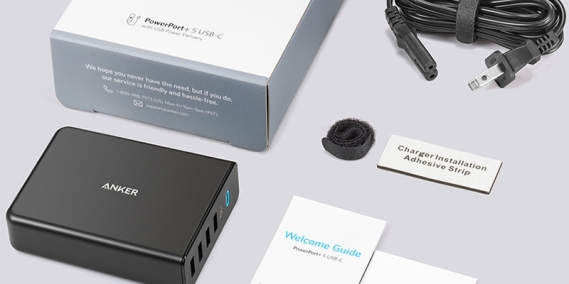
It works with Windows, macOS, and even Linux systems. The three charging ports are equipped with Anker's PowerIQ technology, which automatically adjusts the power output based on the device being charged.
You can connect external hard drives, phones, USB flash drives, and more without speed drops. The transfer rate is up to 5Gbps, which is fast enough for most day-to-day tasks. This hub also has built-in surge protection, so you don’t have to worry about frying your devices.
Sabrent 4-Port USB 3.0 Hub: Budget-Friendly And Compact
Need something smaller but still reliable? The Sabrent 4-Port USB 3.0 Hub fits comfortably in the palm of your hand, yet handles most basic setups with ease.
It's plug-and-play, meaning you don't need any extra software to get started. Compatible with both Mac and Windows, it's a handy little hub for students, travellers, or anyone working from cafes, coworking spaces, or other remote locations.
The data transfer speed tops out at 5 Gbps, and it supports backwards compatibility with USB 2.0. It doesn't offer charging support for phones or tablets, but for adding more ports to a laptop, it does the job well, without making a dent in your wallet.
UGREEN USB C Hub 9-in-1: Ideal For USB-C Devices
If you're using a newer laptop, such as a MacBook or one of the modern Chromebooks, you likely rely on USB-C. The UGREEN USB-C Hub is made for this.
It offers nine ports: HDMI, SD and microSD card readers, 3 USB 3.0 ports, USB-C PD charging, and even an Ethernet port. This makes it one of the most versatile hubs out there.
Whether you're working from home or need to set up a complete workstation while travelling, this one does it all. It supports 4K video output via HDMI and 100W power delivery via USB-C, allowing you to charge your laptop while using the hub.
Kingston Nucleum: Best For Mac Users
Designed with Apple devices in mind, the Kingston Nucleum offers a clean design and solid performance.
It includes 2 USB-A ports, 2 USB-C ports, HDMI, and both SD and microSD card readers. You can connect a 4K monitor, charge your iPhone, and transfer photos from your camera—all at the same time.
Unlike cheaper hubs that overheat quickly, the Nucleum remains relatively calm, even when handling multiple tasks. It's also built in a slim aluminium casing that pairs well with MacBooks. For photographers and video editors, the inclusion of both SD and microSD slots is a bonus.
Baseus 17-in-1 Docking Station: For The Ultimate Setup
If you're setting up a complete workstation, the Baseus 17-in-1 Docking Station is like bringing a control centre to your desk.
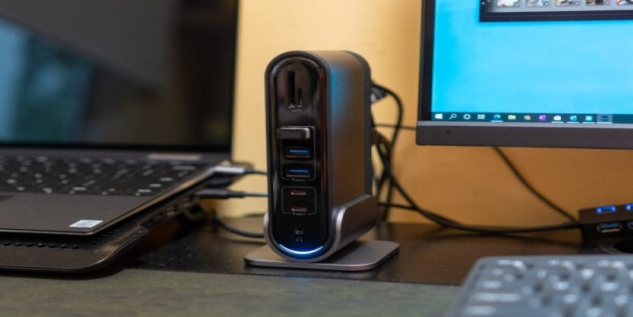
This hub features nearly every port you could want, including USB-A, USB-C, HDMI, DisplayPort, SD/microSD, Ethernet, audio jacks, and more. It supports dual 4K displays, fast charging, and even audio input/output through a 3.5mm jack.
It works with both macOS and Windows, making it ideal for individuals who work with multiple monitors, external storage, and audio equipment. Whether you're editing videos, managing large files, or just need a powerful work setup, this hub covers everything.
Belkin Multiport Adapter: Trusted Brand, Sleek Design
Belkin is known for its durable and well-designed tech accessories, and this USB hub is no exception. It features 2 USB-A ports, a USB-C port, HDMI, an SD card slot, and Ethernet—all packed into a compact aluminium case.
This hub is ideal for users who want a plug-and-play option that works seamlessly without any additional setup. It supports 4K video, fast charging, and gigabit Ethernet for a stable internet connection when Wi-Fi becomes unstable.
It’s a good middle-ground option for people who don’t need as many ports as the Baseus model but still want flexibility and quality.
What to Consider Before Buying
Compatibility
Ensure the hub is compatible with the device you plan to use it with. USB-C hubs won't work on older laptops that only have USB-A, and vice versa.
Data Vs Charging
Some hubs are designed solely for data transfer, while others prioritise charging. A few do both, but those are usually more expensive.
Power Delivery
If you want to charge laptops or tablets through the hub, check the Power Delivery (PD) specifications. Anything above 60W is suitable for most laptops.
Port Selection
Consider the ports you use. If you don't need Ethernet or HDMI, there's no reason to pay extra for those features.
Build And Portability
Plastic builds are lighter and cheaper but tend to overheat. Aluminium ones are sturdier and stay cooler, mainly when used throughout the day.
Final Tips For Getting The Most Out Of Your Hub
Only plug in what you need. Filling up every port all the time can slow down data speeds or overheat the hub. Organise your cables using clips or sleeves to avoid tangles. And keep your hub clean—dusty ports can affect performance over time. A little care goes a long way in keeping your setup efficient and hassle-free.
With a bit of planning, a good USB hub can save you time and frustration. Whether you're connecting a phone, keyboard, or 4K monitor, there's a hub that'll keep everything running smoothly. I hope you find this information informative and worthwhile. Stay tuned for more.