


How Can You Use Note-Taking Apps To Stay Productive Every Day?
Ever feel like there’s too much to juggle—work tasks, errands, goals, ideas, reminders—and no solid system to manage it all? It’s a common experience, especially when priorities shift throughout the day and distractions are everywhere. Without some structure, things slip through the cracks.
Note-taking apps can do much more than store random lists. Used thoughtfully, they serve as a central hub to plan your day, keep track of what matters, and stay focused on what needs to be done. So, how do you make these apps work for your everyday life? Let’s find out.
What Makes A Good Note-Taking App For Daily Use?
Not all apps are created equal, and picking the right one depends on your habits. Do you prefer typing or handwriting? Are you someone who likes structure, or do you prefer more flexibility? Some of the most popular note-taking apps, such as Notion, Evernote, OneNote, and Apple Notes, offer a range of features.

A good note-taking app should:
- Let you organise notes in folders or categories
- Support multimedia (images, links, voice notes)
- Sync across devices
- Offer search functions that help you retrieve what you’ve written later
- Allow for easy integration with calendars, tasks, or email (if needed)
This doesn’t mean you need all the features at once. The real value lies in how you use the app, not just what it can do.
How Can You Build A Daily Note-Taking Habit?
Start small. Open your app each morning and jot down three things:
- What do you plan to focus on today
- Any meetings, calls, or appointments
- One thing you’d like to reflect on or improve
That simple structure—plan, schedule, and reflection—can evolve into a full habit. Over time, you can expand it to include task lists, journal entries, or even project outlines. The point is to make the app a place you check into and rely on every single day, not something you open occasionally and then forget.
You can also use reminders or widgets on your phone’s home screen to encourage regular use. Some people schedule 10 minutes in the morning and another 10 in the evening just to review and update their notes.
How Do Note-Taking Apps Help Organise Your Thoughts?
Ideas often come at the wrong time—while commuting, during a meeting, or just before bed. Instead of losing them, you can quickly add a voice note or a short bullet point in your app. Over a week or a month, these small notes can evolve into larger ideas or projects.
For example, if you're working on a new presentation at work, you can start by noting ideas as they come. Later, you can organise them into a slide structure. Or, if you're planning a family event, jot down to-dos, contacts, or even gift ideas as they come to mind.
Some apps let you tag notes or sort them into sections, which helps group related content together. That way, your thoughts aren’t scattered across sticky notes and apps—they’re all in one place, and easy to find later.
Can You Use Note-Taking Apps To Manage Your Tasks?
Definitely. Many note-taking apps now double as task managers. You can create simple checklists, add deadlines, and even link tasks to specific notes.
Let’s say you’re preparing for a client meeting. You could:
- Create a checklist of what to prepare
- Add research links, key talking points, and questions you want to ask
- Set a reminder the day before
This combines planning and doing in one place. You’re not switching between five different tools, which often causes delays or distractions. Some apps even let you drag tasks around between pages, making it easy to shift priorities as your day changes.
How Can You Use Note-Taking Apps For Work Meetings?
Meetings tend to blur together, especially when your calendar is packed. A note-taking app helps you keep a running record of what was discussed, what’s expected, and what you need to follow up on.
Create a meeting template you can reuse. A basic structure might look like:
- Date & title of the meeting
- Participants
- Main points discussed
- Action items assigned (with deadlines)
- Questions or ideas for follow-up
The benefit here is clarity. When someone asks you next week what came out of that Thursday meeting, you don’t have to guess. It’s right there in your notes. Over time, these meeting notes can become a reference archive.
How Do You Keep Notes Organised Without Getting Overwhelmed?
When you use a note-taking app every day, it’s easy for it to become cluttered. Here’s how to keep it from turning into digital chaos:
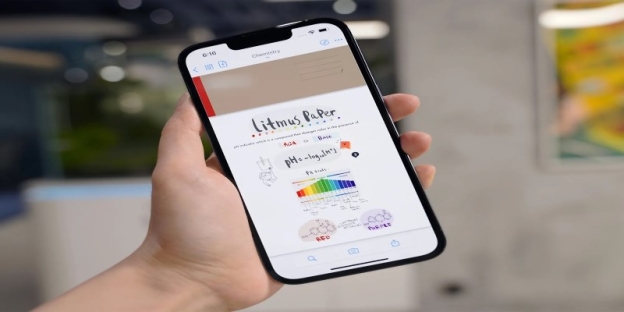
Use Folders Or Tags
Group your notes by category (work, health, ideas, planning).
Review Weekly
Set aside time each week to review and clean up old notes, delete what's no longer useful, or consolidate overlapping thoughts.
Use Clear Titles
Instead of “Meeting”, title your note “Team Sync – July 5”.
Pin Or Favourite Key Notes
Most apps allow you to highlight notes that you use often, so they're always easy to find.
Keep It Short When You Can
Long notes can bury important info. Break down big thoughts into smaller, focused notes so you can scan and find what you need more quickly.
Conducting a brief review once a week is more efficient than trying to sort through everything when it's out of control.
Making Note-Taking Part Of A Productive Life
Using a note-taking app isn't about creating a perfect system—it's about making life a little easier to manage. When your thoughts, tasks, and goals are stored in one place and are easily accessible, you'll feel more in control and less scattered. Whether you're planning your workweek, tracking your goals, or just collecting ideas for the future, a note-taking app can become your daily support system.
Start by choosing one that feels easy to use, and build your structure around it. Once it becomes part of your daily rhythm, you'll wonder how you managed without it.