

How To Pick A Power Bank That Charges Fast?
Have you ever found yourself stranded with a dying phone and no outlet in sight? A power bank can save the day, but not all of them charge your device quickly. Some promise fast charging and fall flat. Others don't support your device at all.
Here's a breakdown of what makes one power bank charge faster than another, the key specs to look for, and how to avoid common mistakes people make when buying one.
Why Do Some Power Banks Charge Faster Than Others?
Not all power banks are built the same. Some charge your phone in less than an hour. Others take nearly all day. The primary difference lies in two key aspects: output power and the charging protocol.
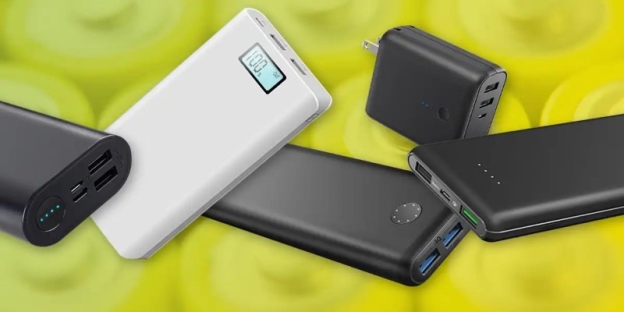
A fast-charging power bank needs to support both high wattage output and the fast-charging standard your device is compatible with. If either is missing, the charging speed will slow down to the lowest standard level.
So, if you want a fast power bank, you'll need to match specs, not just guess based on looks or brand.
Understand Output Power: What Does 18W, 30W, Or 65W Mean?
When you check a power bank’s specs, you’ll see numbers like 10W, 18W, 30W, or even 65W. These numbers refer to the output power—the amount of energy it can deliver to your device.
- 10W: Basic, slower charging. This works well for older phones or small devices, such as earbuds.
- 18W: Standard fast charging. This is ideal for most Android and iPhone models.
- 30W or higher: Needed for tablets, some laptops, or ultra-fast charging for newer smartphones.
If you're just charging a smartphone, a power bank with an output of 18W to 30W is the sweet spot. However, if you plan to charge devices like a MacBook, opt for a 45W or 65W output.
Here’s a tip: check your phone’s maximum supported charging speed, then choose a power bank that matches or slightly exceeds that.
What Is Power Delivery (PD) And Why Does It Matter?
Power Delivery (PD) is a fast-charging technology that many phones, tablets, and laptops support. If your phone uses PD and your power bank doesn't, you won't get fast charging, even if the wattage is high.
PD allows devices to communicate with the power bank to adjust voltage and current for optimal speed. Most iPhones and many Android phones (like Google Pixel and some Samsung models) support PD.
If you see a power bank labelled as "PD 3.0 18W" or "PD 3.0 30W," it means the power bank can fast-charge devices that support Power Delivery at that level. The higher the wattage, the more devices it can help, including larger ones like iPads and laptops.
What About Qualcomm Quick Charge?
Quick Charge (QC) is another fast-charging protocol, developed by Qualcomm. Many Android phones use it, especially those with Snapdragon processors.
If your phone supports Quick Charge, get a power bank that lists QC 3.0 or QC 4.0 compatibility. Some power banks support both PD and QC, which is perfect if you have different devices that use different charging standards.
However, be aware that PD and QC are not the same. A PD-only power bank won't fast-charge a QC-only device, and vice versa. That's why checking compatibility is more important than just seeing "fast charge" written on the box.
Does The Cable Matter?
Yes, it does. Even if your power bank supports fast charging, a low-quality or mismatched cable can slow down the process.
For Power Delivery, you need a USB-C to USB-C cable that supports high-speed charging. For Quick Charge, you’ll usually need a USB-A to USB-C cable that supports QC-level current.
Check whether the cable included in the box is rated for fast charging. If not, you may need to buy a separate one to get full speed.
What Size Power Bank Should You Choose?
Capacity is measured in mAh (milliamp-hours). This doesn't directly affect charging speed, but it indicates how many times the power bank can charge your device.
Here’s a rough idea of what different sizes offer:
- 5,000 mAh: One full phone charge.
- 10,000 mAh: Two charges for most phones.
- 20,000 mAh: Three or more charges, or enough to charge a tablet.
- 30,000 mAh and up: For laptops or long trips, but bulkier.
A 10,000 or 20,000 mAh power bank is enough for most people who want both speed and portability. Ensure it matches the fast-charging standard required by your device.
Should You Pick One With USB-C Or USB-A?
Go for USB-C output whenever possible. It supports higher power delivery and is the go-to for most modern devices.
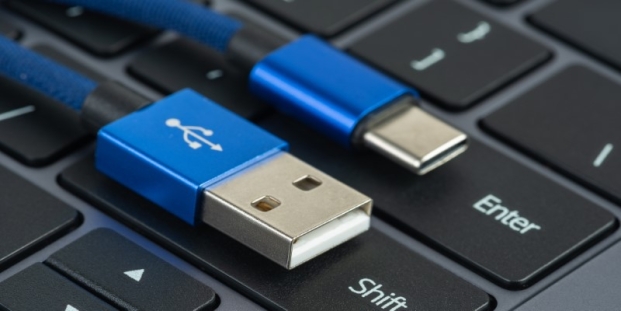
That said, if you have older gadgets, you might still need a USB-A port. Many good power banks today offer multiple ports—one USB-C for fast charging, and one or two USB-A ports for compatibility.
If you want to charge multiple devices simultaneously, look for models that can deliver fast charging to at least one device while charging others.
Does Charging Speed Change When Charging Multiple Devices?
Yes, it usually does. Most power banks split their output power across the ports. That means if you have a 30W power bank and plug in two phones, it might provide each with 15W, or prioritise one and reduce the power to the other.
Some higher-end models can deliver full speed to both devices at once, but they’re usually more expensive.
Check if the brand specifies the maximum output when using multiple ports. It’s often hidden in the fine print, but it makes a difference.
Choosing The Right Fast-Charging Power Bank
Finding a fast-charging power bank doesn't have to be confusing. First, figure out what your phone or device supports: Power Delivery, Quick Charge, or both. Then, pick a power bank that offers the protocol with an output power that matches your needs.
If you just want to charge your phone fast on the go, a 10,000 or 20,000 mAh PD power bank with 18W or 30W output is your best bet. If you need to charge larger devices or multiple phones simultaneously, opt for a model with higher wattage and more ports.