

Which Compact Keyboards Are Best For Office And Travel?
Looking to upgrade your typing setup without lugging around a full-sized keyboard? Whether you're working from a desk or moving between locations, finding a keyboard that is both portable and comfortable to use makes a difference. From mechanical models with a smooth feel to quiet options fit for open offices, here's a complete look at compact keyboards that strike a balance between performance and portability.
Logitech MX Keys Mini – A Smart Choice For Everyday Use
Logitech has long been known for its reliability and clean design, and the MX Keys Mini delivers on both fronts. This wireless keyboard provides a smooth, low-profile typing experience that feels natural, even during extended writing sessions. The keys are quiet, responsive, and shaped to match your fingertips.
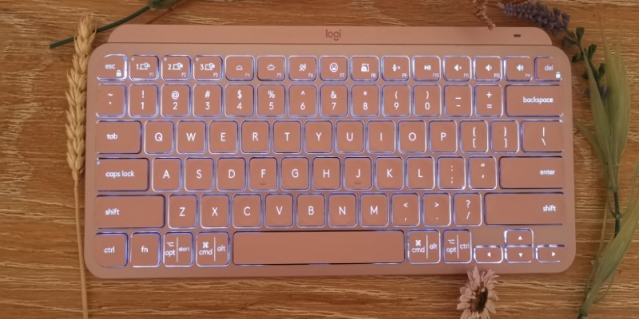
You can pair it with up to three devices and switch between them using dedicated buttons—perfect for people who work across multiple screens. The backlighting adjusts automatically based on your lighting conditions, which is particularly beneficial when working in dim environments, such as hotel rooms or shared co-working spaces.
It charges via USB-C and lasts up to 10 days with backlighting, or up to 5 months without. It’s compact enough to slide into a laptop bag without feeling flimsy or too light.
Keychron K3 – For Mechanical Keyboard Lovers On The Go
Mechanical keyboards are no longer just for gamers. The Keychron K3 combines mechanical switches with a portable, low-profile design. This 75% layout provides you with arrow keys and function rows while still minimising unnecessary bulk.
You can choose between optical and mechanical switches depending on your preference. Optical switches are faster and lighter, while mechanical ones offer a bit more tactile feedback. It supports both Mac and Windows layouts, making it suitable for people who frequently switch systems.
The aluminium frame adds a bit of weight, which helps it stay in place while typing. Battery life ranges from 34 to 99 hours, depending on your backlight usage. You can connect via Bluetooth or use it wired through USB-C. This balance of function and form makes it a strong pick for those who want a premium typing feel without a large footprint.
Apple Magic Keyboard – For Apple Ecosystem Users
If you're deeply immersed in the Apple world, the Magic Keyboard is a straightforward option that pairs seamlessly with your Mac, iPad, or iPhone. It's slim, lightweight, and extremely easy to carry.
The scissor-switch keys offer a quiet and stable typing experience. It charges via a Lightning cable and retains a charge for approximately a month. Although it lacks the clicky feel of mechanical options, its design makes it a good choice for users who value simplicity, minimalism, and direct compatibility.
If you often use multiple Apple devices and want a plug-and-play experience with a consistent look, this is a practical and dependable option.
Microsoft Designer Compact Keyboard – A Minimalist's Favourite
Not every travel-friendly keyboard needs to be packed with features. Some just need to work well and look neat while doing so. Microsoft’s Designer Compact Keyboard checks that box.
This Bluetooth keyboard features a sleek, matte finish and chiclet-style keys that provide soft tactile feedback. The layout is clean and straightforward, which reduces distractions while working. It lacks a backlight and extra function keys, but what it provides in simplicity makes it a favourite for minimalist setups.
The battery life is exceptional, with up to 36 months from two coin-cell batteries. If you don’t want to think about charging and need a keyboard that blends into any setup, this one works well.
Anne Pro 2 – Customizable And Compact
For those who want more control over their setup, the Anne Pro 2 gives you a compact 60% keyboard with fully programmable keys. That means you can customise the key layout, lighting effects, and even function layers using the included software.
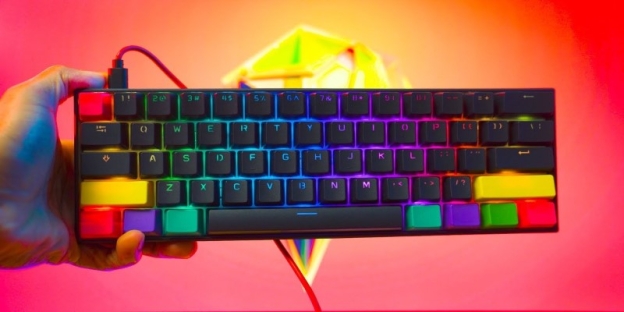
It supports both wired and Bluetooth connections, and you can pair it with up to four devices at once. The battery can last approximately 8 hours on a single charge, and recharging is achieved via a USB-C port.
It comes in multiple switch types, including Gateron and Kailh, offering a choice between softer or more tactile feedback. Despite its smaller size, it doesn't feel cramped once you get used to the layout. If you're okay with a slight learning curve, the customisation options make this a strong contender.
What To Look For In A Compact Keyboard
Finding the right keyboard isn’t just about size—it’s about how and where you plan to use it. Here are two key things to consider when making your pick:
Typing Feel And Noise Level
Think about where you'll be using your keyboard. In quiet office environments or shared spaces, a mechanical keyboard may be too noisy unless you opt for silent switches. If you're working in cafés or libraries, scissors or membrane keys might be a better fit for you.
Connectivity And Battery Life
Bluetooth is convenient, but some people still prefer the speed and reliability of a wired connection. If you’re always on the move, battery life becomes a top priority. Some wireless keyboards can last weeks or even months, while others may need more frequent charging if used with backlights.
Travel-Friendly Features That Make A Difference
Compact keyboards often make small trade-offs, so pay attention to the added features that might improve your daily experience.
Multi-Device Pairing
If you switch between phones, tablets, and laptops, look for keyboards that can pair with multiple devices.
Backlighting
Useful in dim settings, but it will reduce battery life. Some models feature auto-dimming technology to conserve power.
Portability
Consider whether the keyboard fits in your bag without adding bulk or weight. Some models even come with a protective case or foldable design.
A few models, such as the Logitech K380 and the iClever BK10, are designed explicitly for ultra-light travel and may work better if you type occasionally on the go rather than all day.
Final Tip: Match Your Keyboard To Your Workflow
A compact keyboard can speed up your work, save desk space, and travel with you easily—but only if it suits your daily tasks. Think about what you value most: battery life, typing feel, layout familiarity, or extra features. Once you figure that out, choosing becomes a lot easier.