What Are The Best Calendar Apps That Sync Across All Devices?
Have you ever missed a meeting or forgotten a task simply because the reminder didn't appear on your phone, but it was visible on your laptop? It happens to many people.
You might have a calendar set up on your desktop, but nothing is syncing to your tablet. Or you switch between work and personal devices, and your schedule turns into a mess. That's precisely why calendar apps that sync across all devices are so important now. Let's take a deeper look at the top calendar apps that work seamlessly across devices.
Google Calendar: Simple, Free, And Reliable Across Every Device
If you have a Google account, you already have access to Google Calendar, and it's one of the easiest apps to use. What makes it stand out is its seamless integration with all Google products, including Gmail, Google Meet, Google Tasks, and more.
Let’s say you receive an email about a meeting. Google Calendar can auto-detect the details and suggest adding it as an event. It works flawlessly across Android, iOS, web browsers, and smart devices like Google Nest.
You can set different calendars (personal, work, etc.), colour-code them, and share them with others. It's great for teams, families, or anyone juggling multiple parts of life.
Sync time: Real-time updates
Cost: Free
Best for: Anyone who already uses Google services regularly
Microsoft Outlook Calendar: Built For Work, But Useful For Everything
Outlook Calendar is part of Microsoft's productivity suite, and it's tightly connected to Office 365. Many companies rely on it, but it also works well for personal use.
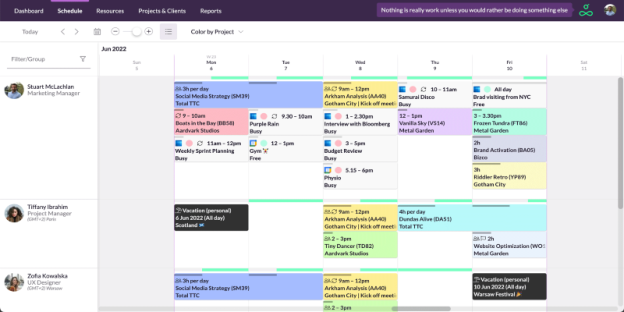
It’s available on all platforms and does a great job syncing appointments, invites, and tasks. You can set meeting alerts, share your calendar, and link it with your email for faster scheduling.
One major plus: Outlook supports both online and offline use. That means even if you lose internet for a while, you won't miss your schedule. When you're back online, it syncs automatically without requiring any extra steps.
Sync time: Instant sync when online
Cost: Free (with advanced features in Microsoft 365 plans)
Best for: Professionals or teams using Microsoft services
Apple Calendar: The Go-To Choice For Apple Ecosystem Users
If you use an iPhone, iPad, or Mac, Apple Calendar might already be your main scheduling app. It’s built into iOS and macOS, which means it’s fast, clean, and works naturally with Siri, iCloud, and other Apple services.
Apple Calendar updates in real time across all your Apple devices. You can add events using voice commands, attach notes or URLs, and set multiple alerts. If you also use a Mac for work and an iPhone for everything else, this app keeps things perfectly in sync.
What's helpful is its location-based reminders. You can set alerts that trigger when you arrive or leave a place. No more missing that appointment just because your usual reminders didn't go off.
Sync time: Real-time with iCloud
Cost: Free
Best for: People fully in the Apple ecosystem
Fantastical: Feature-Packed For Power Users
Fantastical is a favourite among users who want more than a basic calendar. It may look simple, but it's packed with thoughtful features, including natural language input (you can type "Meeting with James at 3 pm next Friday" and it figures everything out), time zone support, and seamless integration with Zoom, Microsoft Teams, and Google Meet.
It works across macOS, iOS, iPadOS, and Apple Watch. One calendar syncs across everything via iCloud, Google, Exchange, or other calendar services. Fantastical’s interface feels more modern and visual than many default apps.
If you're juggling meetings in multiple time zones or want more detailed control over your events, it's a great pick. It isn't free, but many users feel it's worth the cost.
Sync time: Real-time across connected calendars
Cost: Free version available; premium features with subscription
Best for: Users who want extra scheduling tools and innovative features
TimeTree: Ideal For Families, Couples, Or Group Planning
Planning as a group can get messy fast. That’s where TimeTree comes in. It's designed for shared calendars and collaborative scheduling. Families can add chores, meal plans, and school events; couples can plan dates and trips; roommates can manage bills and chores together.
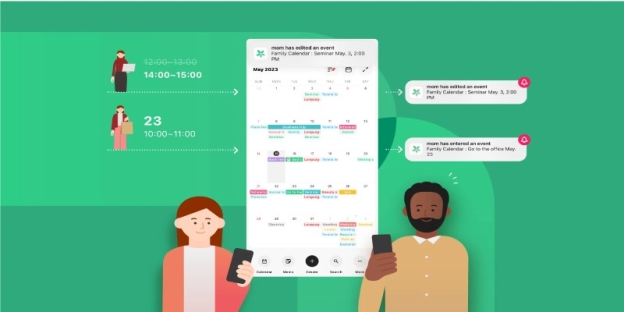
Everyone sees updates in real time, and you can comment directly on calendar events, so there's less back-and-forth messaging.
It works across iOS, Android, and web browsers, and is very easy to use, even for those who are not very tech-savvy.
Sync time: Near-instant sync
Cost: Free
Best for: Families, roommates, or couples needing a shared calendar
Why Syncing Calendars Across Devices Is A Must Today
Most of us no longer use just one device. You may start your day checking email on your phone, then move to your laptop for work, and later look at your tablet while watching TV. When your calendar doesn't sync, your whole routine can fall apart. A change made on one device must be visible instantly on another. That's the only way to keep everything running smoothly.
Whether you're scheduling work meetings, planning travel, or simply trying to remember your friend's birthday, using a calendar app that updates in real-time across platforms is the difference between being in control and constantly scrambling.
Choosing The Right Calendar App For Your Routine
Not everyone needs the same kind of scheduling tool. A remote worker may lean towards Calendar.com for analytics and video links. Someone managing home life might appreciate TimeTree’s shared planning. A student with a mix of Google and Apple devices might find Google Calendar easiest.
The best calendar app is one that doesn't just live on your phone or computer—it travels with you, keeps up with your life, and helps you stay ahead of schedule without adding Stress.
Before choosing one, consider your priorities. Do you need group sharing? Do you use video calls daily? Are you switching between devices often? Once you answer that, it becomes easier to choose a calendar that suits your lifestyle and work habits.